
Private photos mixed into a public camera roll
Privacy hub
Protect your personal information with calmer digital habits.
Learn how private photo vaults, secure notes, device locks, local storage, iCloud Sync, and Cloud Backup fit into a practical privacy-first workflow.
Why this matters
Personal information spreads faster than most people realize.
Photos, videos, notes, files, and backups often end up across camera rolls, shared libraries, cloud drives, and default apps. A privacy-first workflow starts by separating sensitive content, protecting access, and deciding what should sync.
Personal notes stored beside shared work notes
Backups enabled without understanding what is included
Sensitive spaces
2 apps
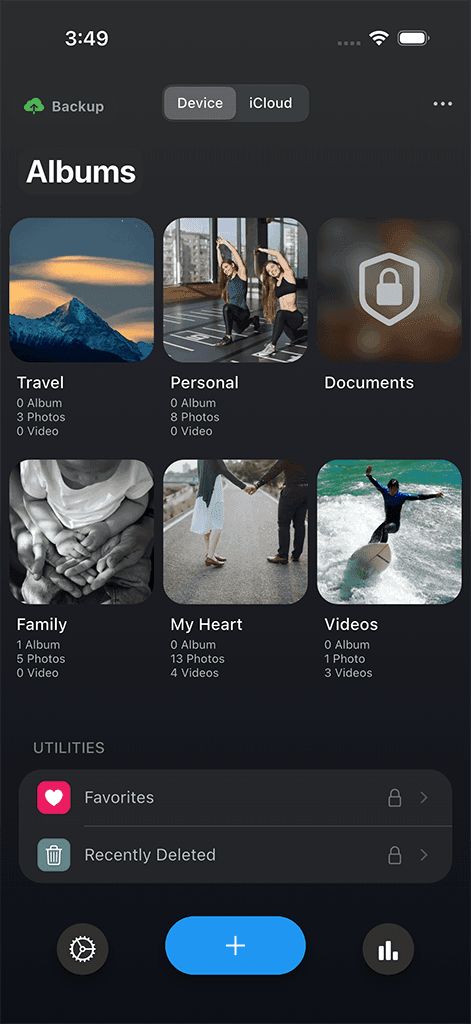
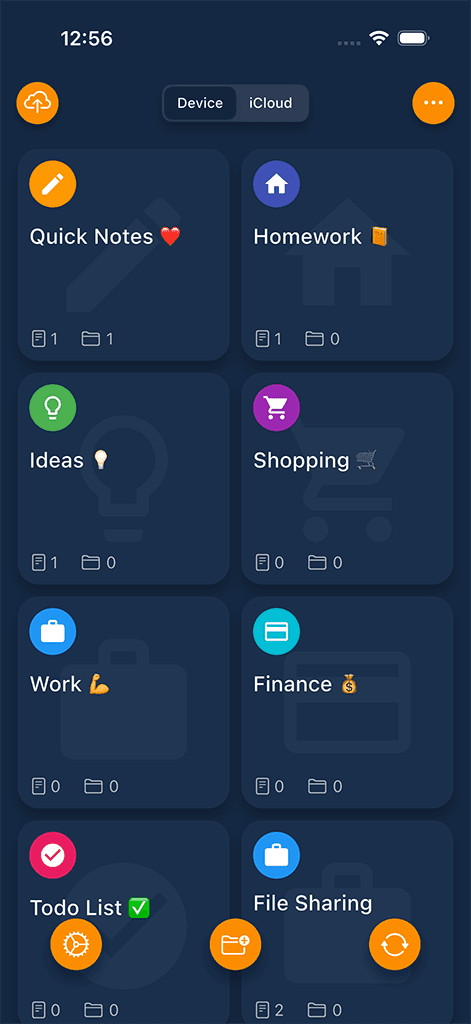
Safety Photo+Video and Safety Note+ cover private media and notes.
Access controls
Face ID
Use device security features where supported.
Storage choices
Local + sync
Keep local-first habits while enabling sync or backup intentionally.
Common challenges
The patterns that make this harder than it should be
Hidden albums are easy to forget
A basic hidden album may not give private media a clear workflow for organization, backup, and access.
Notes can become too exposed
Sensitive notes often sit beside regular notes, shared accounts, or searchable app libraries.
Sync settings can be confusing
People need clear choices about what stays local, what syncs, and what is backed up.
Passcodes need to stay practical
Privacy tools only work when secure access is fast enough for everyday use.
How Sixbytes helps
Sixbytes keeps privacy practical and understandable.
The goal is not to make privacy feel technical. It is to give sensitive content dedicated places, familiar device locks, and clear paths for sync and backup when they are useful.
Separate sensitive content
Use focused apps for private photos, videos, and notes instead of mixing them into default libraries.
Use familiar access controls
Face ID, Touch ID, and passcodes make privacy easier to maintain where supported.
Choose storage intentionally
Local storage, iCloud Sync, and Cloud Backup each have a place when users understand the tradeoffs.
Compare approaches
Match each app to the job it is meant to do
| App | Private media | Secure notes | Device lock | Sync / backup |
|---|---|---|---|---|
| Safety Photo+Video | Photos and videos | Not primary | Face ID / passcode | iCloud Sync / Cloud Backup |
| Safety Note+ | Not primary | Private notes | Face ID / passcode | iCloud Sync / Cloud Backup |
Featured products
Relevant Sixbytes apps for this workflow

Privacy · Private photo & video vault
Safety Photo+Video
A private photo and video vault with protected albums, decoy access, and optional zero-knowledge encrypted backup and restore.
- Face ID and passcode protection
- Private albums
- Decoy vault access
- Zero-knowledge encrypted backup
- Secure restore

Privacy · Private secure notes
Safety Note+
Locked private notes with decoy access, folder-specific locks, intruder reports, and platform-specific backup options.
- Passcode protection
- Face ID support
- Decoy password
- Folder-specific locks
- Intruder reports
Educational guides
Continue learning with practical resources
 Cloud Sync
Local Storage vs Cloud Backup
Understand the privacy, convenience, and recovery tradeoffs between local-first storage and cloud backup.
Published Feb 4, 2026 · 6 min readRead guide
 Security
Lock Notes on iPhone
A practical guide to storing private notes, sensitive lists, and personal information more safely on iPhone.
Published Jan 18, 2026 · 6 min readRead guide
 Comparisons
Best Photo Vault Apps for iPhone and Android: How to Choose
Choose a photo vault app by testing its privacy controls, original-file export, backup, recovery, maintenance, and total cost before trusting it.
Published Jan 10, 2026 · 9 min readRead guide
Frequently asked
Questions about this solution
A privacy-first workflow separates sensitive content, protects access with device security where possible, and makes sync or backup choices intentionally.
Usually no. Photos, videos, and notes have different organization needs, so dedicated apps can keep each workflow clearer.
No. Sixbytes apps support better habits, but users should still review device settings, backups, sharing, and account access.
Safety Photo+Video has its own official website at safetyphoto.app for full product details, tutorials, privacy resources, downloads, and help content.
The most sensitive content is often best kept local unless you have a clear reason to sync or back it up.
Next step
Build a calmer privacy workflow.
Explore Sixbytes privacy apps, then continue into the guides for practical privacy habits.